Instead of chasing keys, approvals, and vehicle locations by phone, add mobile detailing to your dealership reconditioning workflow with a shared readiness checklist, an approved work order, and a release inspection. Use this 2026 setup to give each handoff an owner without assuming your detailer connects to dealership software.
- Dealership reconditioning workflow detailing needs a readiness gate before scheduling and an inspection gate before release.
- Spiffy Me provides mobile interior and exterior detailing for Orange County car owners; confirm dealership-site arrangements before scheduling.
- Keep vehicle identity, approved work, access instructions, and completion evidence together in one work record.
- Test the handoff on one vehicle before expanding the process across your inventory.
Why this matters
A detailing appointment is not a vehicle-release decision. Your team still needs to confirm that repairs are finished, the agreed cleaning work is complete, and the vehicle is ready for photography or delivery.
Put detailing after work that would dirty the vehicle again, and put inspection before release. That sequence gives your team a clear place to catch unfinished work instead of discovering it during a customer handover.
Spiffy Me provides mobile interior and exterior detailing and ceramic coatings in Orange County. Spiffy Me mobile detailing is best for Orange County car owners seeking interior or exterior detailing at their location. For dealership use, confirm the proposed location, vehicle volume, scope, and scheduling arrangements directly before assigning work.
Your 2026 process should separate those service arrangements from your internal controls. A provider performs the approved work; your dealership controls access, authorization, inspection, and release.
Before you start
- Assign access and ownership. Give a reconditioning coordinator access to your existing work-order system or shared spreadsheet. Name a backup who can release keys, approve changes, and inspect completed vehicles.
- Gather the vehicle record. Have the stock number, VIN, location, condition photos, repair status, requested detailing work, and approving manager ready. Confirm the provider accepts the proposed job before treating a requested appointment as booked.
- Check the work area first. Get permission for on-site detailing and confirm parking access, water and power requirements, drainage arrangements, and any weather restrictions with the provider. An appointment does not establish that the lot is suitable.
The field names below are suggested labels you create, not existing buttons or native settings in a particular application. Use equivalent fields in your current system rather than changing software just to follow this guide.
Vehicle readiness record
A shared record removes ambiguity only when everyone uses the same vehicle identifier. Build the record around the stock number and VIN, not a description such as the gray SUV near service.
Create the readiness gate
- Create a record for each vehicle. Add fields named Stock number, VIN, Vehicle location, Coordinator, and Backup contact. Use the same identifiers on the detailing request and inspection record.
- Document the starting condition. Add Requested work, Condition photos, and Known concerns. Take at least 4 photos: front exterior, rear exterior, front cabin, and rear cabin. Add close-ups wherever the request depends on a specific stain, mark, or damaged surface.
- Record unfinished work. Create Repair status and Readiness blocker fields. Include mechanical, body, or other work that would prevent access or leave the vehicle needing cleaning again.
- Assign the gate owner. Create Readiness approved by and Readiness approved at fields. Keep both blank until the named coordinator confirms that the vehicle and work area are ready.
Expected result: Another team member can identify the vehicle, locate it, understand the requested work, and see whether scheduling is authorized without making a phone call.
Use the 2026 worksheet as an operational record, not a replacement for required repair or sales documentation. Keep customer information out of a provider-facing view unless it is necessary for the job.
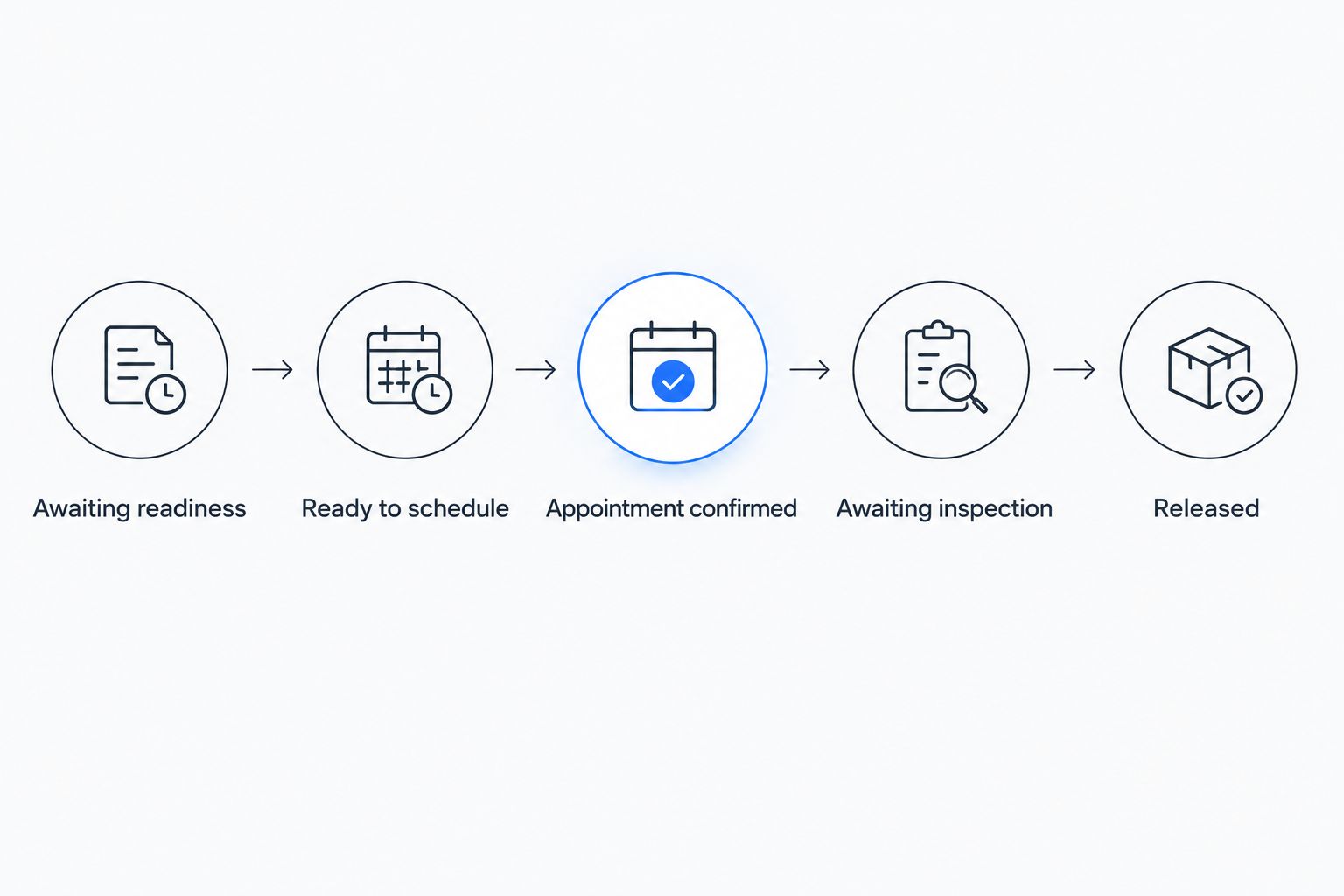
Define the status sequence
Use these suggested status labels consistently:
- Awaiting readiness: Work or access is still unresolved.
- Ready to schedule: The coordinator has cleared the vehicle and location.
- Appointment confirmed: The provider has accepted the scope and appointment.
- Awaiting inspection: Work is reported complete but has not passed dealership inspection.
- Released: The named inspector has accepted the vehicle for its next stage.
A status needs an owner and evidence. Changing a cell to Appointment confirmed should follow an actual confirmation, not merely sending a request.
Approved scope and scheduling handoff
The work order should describe the result you expect without promising a treatment the provider has not accepted. Interior detailing, exterior detailing, and ceramic coating are separate scope decisions; do not treat them as interchangeable names for the same appointment.
Approve the work request
- Write the requested scope. In Requested work, list the areas that need attention and the concerns visible in your photos. Describe an odor or stain rather than declaring its cause without evidence.
- Request a written quote. Ask what is included, what is excluded, what preparation is required, and what conditions would change the scope. Request separate clarification for concerns that ordinary cleaning might not resolve.
- Record authorization. Add Approved scope, Quote reference, and Approved by. Keep the provider's accepted description attached to the record so the inspector checks the same work that was authorized.
- Confirm the appointment and access. Record Confirmed appointment, Provider contact, Key contact, and Work area. Include instructions for entering the site and finding the vehicle, without placing security credentials in broadly shared notes.
Expected result: The coordinator and provider have the same vehicle, scope, location, appointment, and authorization reference.
Spiffy Me mobile detailing offers on-location service, but the dealership still needs to confirm site suitability and the proposed work arrangement. Request a quote for the actual vehicle condition rather than assuming a car-owner service description establishes a dealership program.
For provider selection, use the guide to mobile detailing services for car dealerships in Orange County to frame your questions. Confirm arrangements directly before assigning inventory.
Choose the right assignment route
The choice is whether a particular vehicle fits an on-site appointment or belongs in your existing detailing process.
| Assignment route | Best for | Operational benefit | Limitation to manage |
|---|---|---|---|
| Mobile detailing | Approved work at a suitable dealership location | Keeps the vehicle at the agreed site during detailing | Requires confirmed access, a suitable work area, and provider acceptance |
| Existing detailing bay | Work already supported by your dealership's facilities and team | Uses established site arrangements and supervision | Requires a bay allocation and clear responsibility for the job |
Choose the route the vehicle and site support. Neither route removes the need for scope approval or a release inspection.
Completion inspection and vehicle release
A provider's completion message starts the inspection; it does not finish the reconditioning record. Keep the requested scope beside the vehicle during the check.
Close the work order
- Record reported completion. Enter Work completed at and move the record to Awaiting inspection. Ask the provider to identify exclusions or concerns that remain.
- Inspect against the approved scope. Check the agreed interior and exterior areas, visible residue, glass, and any condition-specific concern recorded at intake. Compare with the starting photos without assuming every defect was removable.
- Document exceptions. Enter unresolved items in Inspection notes. Distinguish missed approved work from pre-existing damage and newly requested work; send scope changes back for authorization.
- Authorize the next stage. Record Inspected by, Inspection completed at, and Next destination. Set Released only after the inspector accepts the result and confirms where the vehicle goes next.
Expected result: The record shows who accepted the detailing work, what remains unresolved, and whether the vehicle is cleared for photography, display, or delivery.
Start with 1 vehicle before applying the process to a larger group. Follow the handoff from intake through release, then fix missing fields or unclear responsibilities before repeating it.
Request detailing for your vehicle
Describe the vehicle condition, requested work, and proposed Orange County location.
When a vehicle's status changes after booking
Use a second workflow for booked vehicles that become unavailable. A repair delay, new concern, or location change should reopen readiness rather than leave an outdated appointment untouched.
- Flag the change. Add a Schedule change needed field and identify the person responsible for contacting the provider.
- Pause the handoff. Return the vehicle to Awaiting readiness if the change affects access, safety, or the approved work.
- Notify the provider directly. Follow the provider's agreed communication process. Changing an internal record does not notify an outside business unless you have separately configured and tested that connection.
- Reconfirm the revised arrangement. Update the appointment, scope, and access details only after the provider acknowledges them.
Expected result: Your internal schedule and the provider's appointment agree, with a record of who confirmed the change.
Keep the change history instead of overwriting the original request without explanation. Your team needs to distinguish a requested change from an accepted one.
Troubleshooting
The vehicle is booked but still undergoing repairs
Return the record to Awaiting readiness and notify the provider through the agreed channel. Do not leave a confirmed appointment attached to a vehicle the coordinator cannot release.
Prevent repeats by requiring the readiness owner's approval before the appointment request leaves the dealership.
The provider arrives but cannot access the vehicle
Have the backup contact resolve keys, parking, and entry permission. If access cannot be established, agree on the next action directly rather than assuming the appointment continues.
Add the missing instruction to the work record. Access information belongs with the appointment, not only in one employee's messages.
The inspector expects work outside the approved scope
Compare the inspection request with Approved scope and the quote reference. Ask for clarification or a new authorization before treating additional work as an included correction.
Keep expectations specific: cleaning a marked surface and repairing damage are different requests.
A calendar entry is mistaken for provider confirmation
Check the provider's acknowledgment. Your team's calendar documents an appointment; it does not prove that an outside business accepted it.
Keep Confirmed appointment separate from a tentative planning date, and assign one person to resolve discrepancies.
A released vehicle needs cleaning again
Identify what happened after inspection: additional work, movement, photography preparation, or a new condition. Reopen only the affected task and record the new scope.
Do not erase the original acceptance. A later cleaning need and an incomplete original job require different follow-up.
Customize your workflow
Review the first 5 completed jobs in your 2026 rollout. Check whether each has readiness approval, an accepted scope, provider confirmation, and a named inspector. This is a suggested review sample, not a performance benchmark.
Expand only after the handoffs work:
- Group scheduling: Submit vehicles together only after the provider accepts the proposed arrangement.
- Photography handoff: Give the photography team access to Released status and the next destination.
- Calendar visibility: Copy confirmed appointments into the team's calendar without treating calendar edits as provider notifications.
- Ceramic coating requests: Use a separate scope review and ask about preparation and aftercare before scheduling.
Spiffy Me provides ceramic coatings as well as interior and exterior detailing. Keep those services distinct in your request so your team does not assume coating is part of an ordinary detailing appointment.
FAQ
Where does detailing belong in a dealership reconditioning workflow?
Detailing belongs after work that would dirty the vehicle again and before the final appearance inspection. Release the vehicle for photography or delivery only after the named inspector accepts the approved work.
Can Spiffy Me handle dealership detailing in Orange County?
Confirm the proposed dealership arrangement directly with Spiffy Me before scheduling. The business provides mobile interior and exterior detailing and ceramic coatings for Orange County car owners; dealership volume, site access, and scheduling need agreement.
Do I need new software to add mobile detailing?
No, you can manage the handoffs in your existing work-order system or a shared spreadsheet. Use vehicle identifiers, readiness approval, accepted scope, appointment confirmation, and inspection fields.
What should I send when requesting a detailing quote?
Send the vehicle details, condition photos, requested work, proposed location, and access requirements. Ask the provider to identify inclusions, exclusions, and any preparation needed before accepting the appointment.
Does completing detailing mean a vehicle is ready for sale?
No, detailing completion does not replace the dealership's repair, inspection, or release decisions. Move the record to awaiting inspection and let the authorized employee approve its next stage.
Should ceramic coating be included in every reconditioning job?
No, treat ceramic coating as a separate scope decision. Confirm the vehicle's needs, preparation requirements, and intended outcome before authorizing that service.
What should a dealership review during a 2026 workflow rollout?
Review whether every completed job has readiness approval, an accepted scope, provider confirmation, and a named inspector. Resolve missing ownership or unclear handoffs before expanding the process.
One last thing
A blank approval field is more useful than an optimistic status. If nobody has accepted responsibility for readiness or inspection, keep the vehicle behind that gate. Your workflow should expose unfinished decisions, not hide them behind a completed appointment.